Open-weight 4.0 model
Ideogram 4.0 is positioned as a 9.3B open-weight text-to-image foundation model for design workflows.
Updated June 2026 · Unofficial guide
Everything you need to know about Ideogram 4.0, from features to JSON prompt tips.
Section 1
A practical overview for searchers who want the short version before they start prompting.
Ideogram 4.0 is Ideogram's newer text-to-image model direction for design-focused generation. It is built for outputs where layout, readable typography, brand-style graphics, and object placement matter.
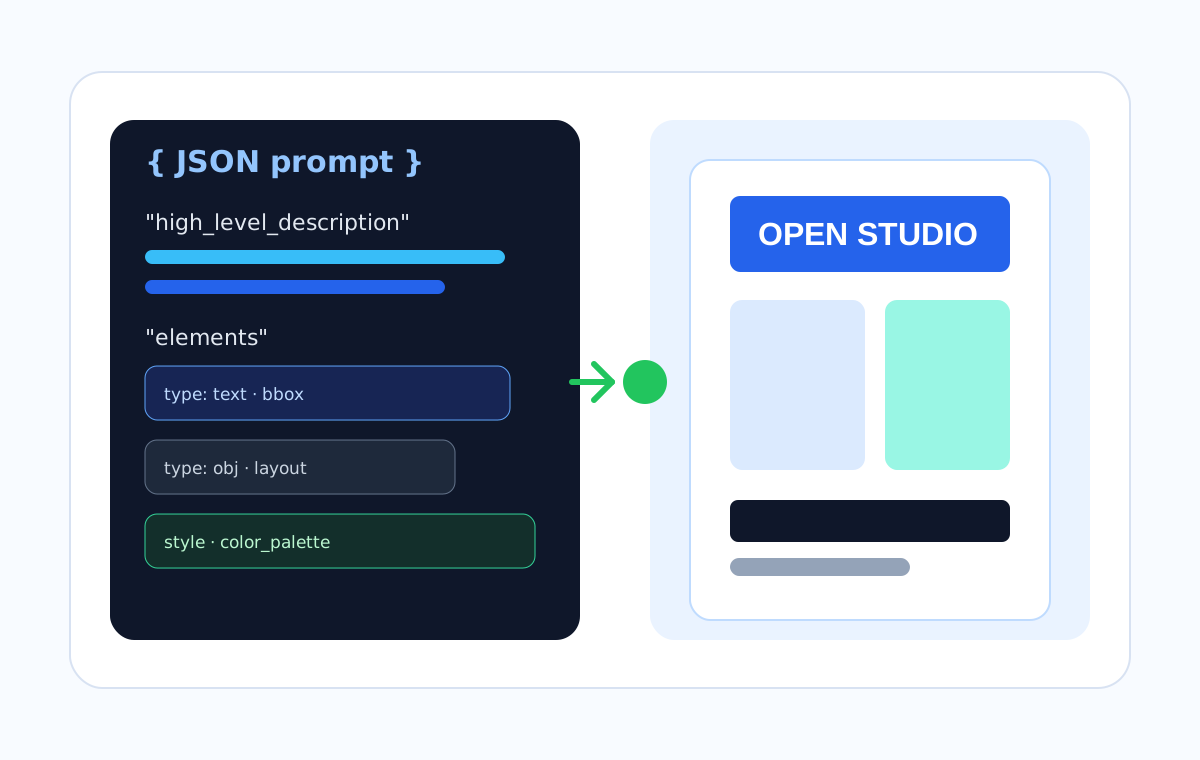
Compared with a simple natural-language prompt, the important shift is structure. Ideogram 4.0 can work from JSON-style prompts that describe the scene, style, text layers, objects, colors, and optional bounding boxes.
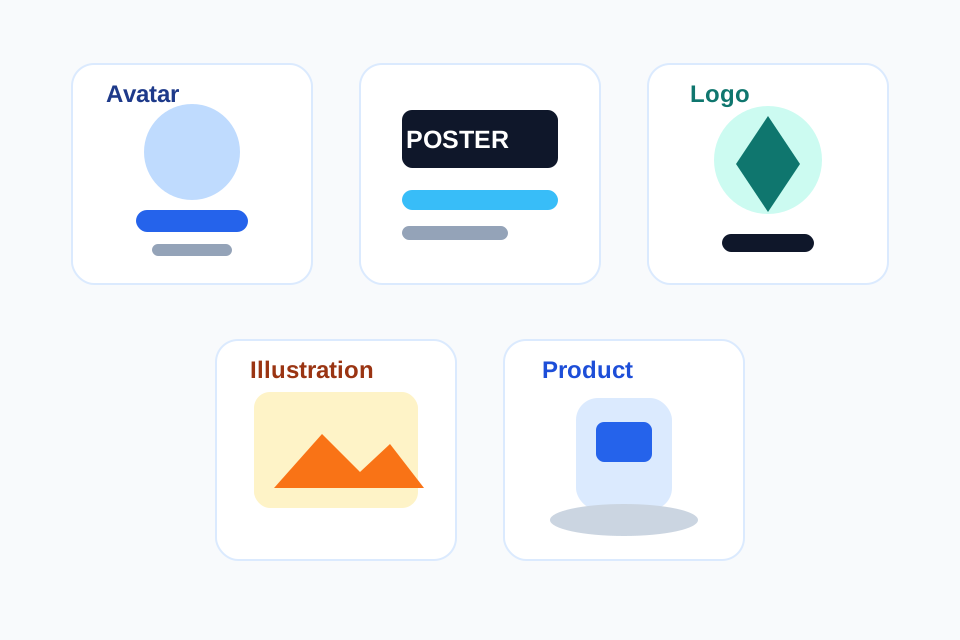
This makes it especially useful for posters, logos, product mockups, social posts, editorial visuals, and any image where the text must be spelled correctly and placed deliberately.
The core improvement over Ideogram 3.0 is not just image quality. Ideogram 3.0 was already strong at photorealism, text rendering, and style references. Ideogram 4.0 pushes toward more explicit layout control through structured JSON, palette conditioning, and precise element descriptions.
Ideogram 4.0 is positioned as a 9.3B open-weight text-to-image foundation model for design workflows.
The model is trained around structured captions, so layout, typography, objects, colors, and relationships can be written as fields.
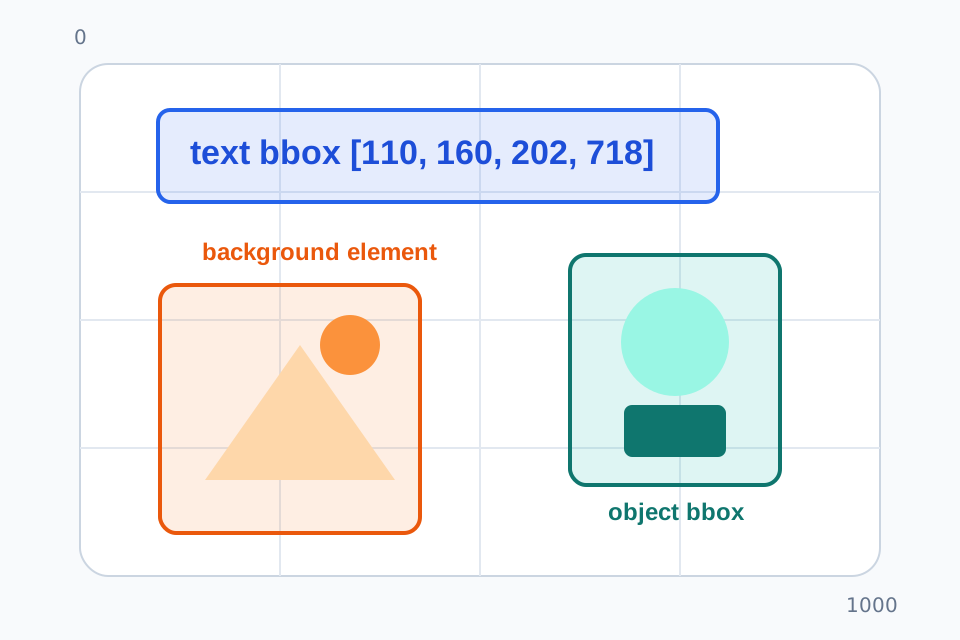
Optional bboxes place text and objects with normalized coordinates, making dense posters and product layouts easier to direct.
The strongest use cases are typography, logos, posters, advertising concepts, product scenes, and design assets.
The Ideogram API offers a v4 generation endpoint and accepts plain text or structured JSON prompts.
Section 2
For serious control, stop writing one long paragraph. Describe the image as structured data.
Ideogram 4.0's reference approach is built around structured JSON prompts. Some hosted flows can still accept plain text, but JSON is the format to use when you need dependable layout, typography, and color control.
Think of the prompt as a design brief with layers. Start with a high-level description, define the style, describe the background, then list the visual elements one by one. Use a separatetext element for any words you want inside the image.
Bounding boxes are optional, but they are the key to predictable composition. The common convention is[y_min, x_min, y_max, x_max] on a 0-1000 normalized canvas, with the origin at the top-left.
high_level_descriptionThe one-sentence brief. State the subject, format, purpose, and most important outcome.
style_descriptionThe visual system: aesthetics, lighting, medium, texture, and color palette.
compositional_deconstruction.backgroundThe setting or base layer that everything else sits on.
elements[]Every important object or text layer. Use separate entries when placement or styling matters.
typeUsually "obj" for visual objects and "text" for literal in-image text.
bboxOptional [y_min, x_min, y_max, x_max] box in normalized 0-1000 image coordinates.
textThe exact words you want rendered. Keep spelling, line breaks, and capitalization deliberate.
descA detailed visual description for that element, including style and legibility requirements.
Expected effect: a clean square poster with a large readable headline, exact event details, and a controlled abstract graphic aligned to a grid.
{
  "high_level_description": "A square event poster for an independent design meetup called 'OPEN STUDIO NIGHT', with crisp readable typography, a structured grid, and a calm blue-green palette.",
  "style_description": {
    "aesthetics": "Modern editorial poster, clean Swiss grid, confident spacing, subtle paper texture.",
    "lighting": "Flat print-design lighting with no shadows.",
    "medium": "Graphic design poster.",
    "color_palette": [
      "#0F172A",
      "#2563EB",
      "#67E8F9",
      "#F8FAFC"
    ]
  },
  "compositional_deconstruction": {
    "background": "Full-bleed off-white paper background with a very light blue grid and a narrow cobalt border.",
    "elements": [
      {
        "type": "text",
        "text": "OPEN\nSTUDIO\nNIGHT",
        "bbox": [
          120,
          150,
          360,
          850
        ],
        "desc": "Large uppercase headline, bold geometric sans-serif, deep navy letters, perfectly legible."
      },
      {
        "type": "text",
        "text": "June 18 / 7 PM / Design Lab",
        "bbox": [
          410,
          210,
          470,
          790
        ],
        "desc": "Small event details in cobalt blue, centered under the headline."
      },
      {
        "type": "obj",
        "bbox": [
          520,
          160,
          820,
          840
        ],
        "desc": "Abstract arrangement of flat cyan rectangles and thin navy lines, aligned to the same grid as the text."
      }
    ]
  }
}Expected effect: a premium catalog-style image with one fictional product as the focus, realistic shadows, and a small readable product label.
{
  "high_level_description": "A premium product image for a fictional matte ceramic desk lamp, shown on a minimal work desk with accurate shadows and clean commercial styling.",
  "style_description": {
    "aesthetics": "Premium product photography, quiet, sharp, realistic, high-end catalog look.",
    "lighting": "Large softbox from upper left, gentle shadow on the desk, realistic reflections on ceramic.",
    "medium": "Photograph.",
    "color_palette": [
      "#F8FAFC",
      "#CBD5E1",
      "#2563EB",
      "#111827"
    ]
  },
  "compositional_deconstruction": {
    "background": "A bright neutral studio desk scene with a soft gray wall, uncluttered and realistic.",
    "elements": [
      {
        "type": "obj",
        "bbox": [
          180,
          380,
          780,
          650
        ],
        "desc": "Fictional matte ceramic desk lamp, rounded shade, slim base, cobalt blue power button, hero product in focus."
      },
      {
        "type": "obj",
        "bbox": [
          660,
          160,
          820,
          420
        ],
        "desc": "Small stack of two white notebooks and a graphite pencil, secondary prop, slightly out of focus."
      },
      {
        "type": "text",
        "text": "AERO LAMP",
        "bbox": [
          100,
          120,
          170,
          440
        ],
        "desc": "Small product label in clean navy sans-serif, readable but not dominant."
      }
    ]
  }
}Expected effect: a polished profile avatar with a centered subject, simple frame, clean palette, and no busy background.
{
  "high_level_description": "A polished professional avatar illustration of a friendly creative director, centered, suitable for a social profile.",
  "style_description": {
    "aesthetics": "Soft editorial vector-inspired illustration, refined shapes, warm human expression.",
    "lighting": "Soft front lighting with gentle depth.",
    "medium": "Digital illustration.",
    "color_palette": [
      "#1E3A8A",
      "#38BDF8",
      "#FDE68A",
      "#FAFAFA"
    ]
  },
  "compositional_deconstruction": {
    "background": "Simple off-white circular backdrop with two thin cobalt accent arcs.",
    "elements": [
      {
        "type": "obj",
        "bbox": [
          180,
          280,
          850,
          720
        ],
        "desc": "Bust portrait of a creative director with short dark hair, navy jacket, relaxed smile, clean facial details."
      },
      {
        "type": "obj",
        "bbox": [
          110,
          160,
          880,
          840
        ],
        "desc": "Soft circular frame and minimal geometric accents, never covering the face."
      }
    ]
  }
}
Section 3
Copy these original JSON prompt templates and adjust the subject, palette, text, and bounding boxes.
{
  "high_level_description": "A clean founder avatar portrait, confident and approachable, designed for a startup profile page.",
  "style_description": {
    "aesthetics": "Editorial portrait, realistic but slightly polished.",
    "lighting": "Soft window light, gentle background separation.",
    "medium": "Photograph.",
    "color_palette": [
      "#0F172A",
      "#E0F2FE",
      "#F8FAFC"
    ]
  },
  "compositional_deconstruction": {
    "background": "Minimal light blue-gray studio background with no distracting props.",
    "elements": [
      {
        "type": "obj",
        "bbox": [
          120,
          300,
          900,
          700
        ],
        "desc": "Centered head-and-shoulders portrait, natural expression, crisp eyes, navy casual jacket."
      }
    ]
  }
}{
"high_level_description": "A square event poster for an independent design meetup called 'OPEN STUDIO NIGHT', with crisp readable typography, a structured grid, and a calm blue-green palette.",
"style_description": {
"aesthetics": "Modern editorial poster, clean Swiss grid, confident spacing, subtle paper texture.",
"lighting": "Flat print-design lighting with no shadows.",
"medium": "Graphic design poster.",
"color_palette": [
"#0F172A",
"#2563EB",
"#67E8F9",
"#F8FAFC"
]
},
"compositional_deconstruction": {
"background": "Full-bleed off-white paper background with a very light blue grid and a narrow cobalt border.",
"elements": [
{
"type": "text",
"text": "OPEN\nSTUDIO\nNIGHT",
"bbox": [
120,
150,
360,
850
],
"desc": "Large uppercase headline, bold geometric sans-serif, deep navy letters, perfectly legible."
},
{
"type": "text",
"text": "June 18 / 7 PM / Design Lab",
"bbox": [
410,
210,
470,
790
],
"desc": "Small event details in cobalt blue, centered under the headline."
},
{
"type": "obj",
"bbox": [
520,
160,
820,
840
],
"desc": "Abstract arrangement of flat cyan rectangles and thin navy lines, aligned to the same grid as the text."
}
]
}
}{
"high_level_description": "A vertical product launch poster for a fictional app called 'Flowdesk', with large readable launch text and a clean software aesthetic.",
"style_description": {
"aesthetics": "Minimal tech editorial, precise layout, polished.",
"lighting": "Flat graphic lighting.",
"medium": "Digital poster.",
"color_palette": [
"#111827",
"#2563EB",
"#A7F3D0",
"#FFFFFF"
]
},
"compositional_deconstruction": {
"background": "White background with a subtle grid and a thin cobalt line system.",
"elements": [
{
"type": "text",
"text": "FLOWDESK\nLAUNCH",
"bbox": [
120,
120,
330,
840
],
"desc": "Huge bold headline, navy, exact spelling, high contrast."
},
{
"type": "text",
"text": "Build your week in one calm workspace",
"bbox": [
370,
150,
440,
820
],
"desc": "Readable subtitle in smaller sans-serif text."
},
{
"type": "obj",
"bbox": [
510,
180,
820,
820
],
"desc": "Abstract dashboard mockup made of simple panels, no real logos."
}
]
}
}{
"high_level_description": "A simple monoline logo concept for a fictional cafe named 'North Pier Coffee'.",
"style_description": {
"aesthetics": "Minimal, vector-friendly, balanced negative space.",
"lighting": "Flat logo presentation.",
"medium": "Logo design.",
"color_palette": [
"#0F172A",
"#2563EB",
"#FFFFFF"
]
},
"compositional_deconstruction": {
"background": "Plain white background.",
"elements": [
{
"type": "obj",
"bbox": [
190,
330,
610,
670
],
"desc": "Simple line icon combining a coffee cup and a small pier wave, original mark, no resemblance to existing logos."
},
{
"type": "text",
"text": "NORTH PIER COFFEE",
"bbox": [
650,
220,
760,
780
],
"desc": "Clean uppercase wordmark, evenly spaced, fully readable."
}
]
}
}{
"high_level_description": "An editorial illustration explaining structured AI prompting as a tidy visual workflow.",
"style_description": {
"aesthetics": "Clear magazine illustration, calm, modern, friendly.",
"lighting": "Soft ambient light with gentle depth.",
"medium": "Digital illustration.",
"color_palette": [
"#2563EB",
"#14B8A6",
"#FDE68A",
"#F8FAFC"
]
},
"compositional_deconstruction": {
"background": "Light neutral workspace with three connected panels: prompt, layout, result.",
"elements": [
{
"type": "obj",
"bbox": [
180,
90,
760,
300
],
"desc": "Left panel showing simplified JSON braces and colored field rows."
},
{
"type": "obj",
"bbox": [
180,
360,
760,
610
],
"desc": "Middle panel showing bounding boxes on a blank image canvas."
},
{
"type": "obj",
"bbox": [
180,
670,
760,
910
],
"desc": "Right panel showing a polished poster result with readable headline blocks."
}
]
}
}{
"high_level_description": "A premium product image for a fictional matte ceramic desk lamp, shown on a minimal work desk with accurate shadows and clean commercial styling.",
"style_description": {
"aesthetics": "Premium product photography, quiet, sharp, realistic, high-end catalog look.",
"lighting": "Large softbox from upper left, gentle shadow on the desk, realistic reflections on ceramic.",
"medium": "Photograph.",
"color_palette": [
"#F8FAFC",
"#CBD5E1",
"#2563EB",
"#111827"
]
},
"compositional_deconstruction": {
"background": "A bright neutral studio desk scene with a soft gray wall, uncluttered and realistic.",
"elements": [
{
"type": "obj",
"bbox": [
180,
380,
780,
650
],
"desc": "Fictional matte ceramic desk lamp, rounded shade, slim base, cobalt blue power button, hero product in focus."
},
{
"type": "obj",
"bbox": [
660,
160,
820,
420
],
"desc": "Small stack of two white notebooks and a graphite pencil, secondary prop, slightly out of focus."
},
{
"type": "text",
"text": "AERO LAMP",
"bbox": [
100,
120,
170,
440
],
"desc": "Small product label in clean navy sans-serif, readable but not dominant."
}
]
}
}{
"high_level_description": "A top-down flat lay of fictional skincare packaging named 'Luma Daily', arranged for a clean ecommerce banner.",
"style_description": {
"aesthetics": "Premium clean beauty photography, balanced spacing.",
"lighting": "Soft daylight, gentle natural shadows.",
"medium": "Photograph.",
"color_palette": [
"#FFFFFF",
"#DBEAFE",
"#93C5FD",
"#111827"
]
},
"compositional_deconstruction": {
"background": "White stone surface with very subtle texture and no clutter.",
"elements": [
{
"type": "obj",
"bbox": [
260,
210,
760,
450
],
"desc": "Matte pump bottle with fictional label, clean blue accent band, centered."
},
{
"type": "obj",
"bbox": [
310,
520,
700,
740
],
"desc": "Matching cream jar and folded product card, aligned diagonally."
},
{
"type": "text",
"text": "LUMA DAILY",
"bbox": [
150,
570,
240,
830
],
"desc": "Readable product line text on the card only, crisp sans-serif."
}
]
}
}Section 4
Short answers for the questions users usually ask before trying Ideogram 4.0.
The Ideogram app has a free plan with limited slow credits. Ideogram 4.0 API access is priced per image, and open-weight usage is subject to Ideogram license terms. Always check the current official pricing before commercial use.
Ideogram 3.0 focused on strong photorealism, prompt alignment, text rendering, and style references. Ideogram 4.0 adds an open-weight foundation model direction, structured JSON prompting, bounding-box layout control, color palette conditioning, and stronger control for dense design compositions.
Start with high_level_description, add style_description, then break the image into background and elements. Use separate text elements for exact words, and add bbox coordinates when placement matters.
Yes. Ideogram documents a v4 generate endpoint for hosted API use. It supports plain text_prompt and structured json_prompt inputs.
It is especially suited to design-heavy styles: photorealistic product images, typography posters, logos, brand graphics, advertising concepts, editorial illustration, fashion, food, and social media visuals.